
CASE STUDY - 0-TO-1 PRODUCT DESIGN LEADERSHIP & STRATEGY
Defining Docufy AI from zero
For startups in the pre-seed stage, speed and relevance isn't just a metric, it is survival. With no defined product and no confirmed user, I shaped the product into a sellable MVP.
Docufyai is an AI platform designed to transform how enterprises interact with their vast document repositories.
My Role
Founding Product Designer & Design Lead
Tools
Figma, Jotform, Miro, Framer, Perplexity, Claude
Timeline
Jun 2025 – present
0-to-1 product definition
Competitive analysis
Field research
Personas & user definition
Interaction design
Team leadership & mentorship
Scope negotiation
01 -
Context: a product with no edges
No defined product, no confirmed user, and no runway to get it wrong slowly.
Docufy AI was conceived to let enterprises "talk" to their documents. Contracts, disclosures, technical specs, claims files are some that people analyze manually, often cross-checking to reduce human error.
The challenge wasn't only technical, it was psychological. Enterprises are rightly skeptical of AI hallucinations, and these users handle documents where a wrong answer has consequences
4 pilot companies signed
Enterprise clients in sensitive, document-heavy industries evaluated and adopted the MVP, with a fifth company in talks.
MVP to Beta in three months
MVP launched February 2026, Beta launched May 2026 with trust features designed from pilot feedback.
Raised credits over $400K
From investors including the Government of Ontario, Google, and AWS
02 -
RESEARCH: GROUNDING the product in the market
The market sizing of $16.91B total addressable, $5.4B serviceable, $500M share-of-market target, produced by the CEO with the company's subject-matter advisors, was my only way to find an opening.
I ran a competitive analysis across six platforms. Four underserved gaps became Docufy's positioning
Extraction from highly sensitive documents
Output manipulation
Organization-level configuration
Multi-document summarisation
Defining the user
To validate the need, the CEO and I surveyed our professional network. The signal was clear: the strongest need was among corporate employees in sensitive, document-heavy industries. That turned an open-ended brief into a focused enterprise product, and I translated it into two personas that anchored every decision thereafter.

Michael
Insurance underwriter · Toronto
He reviews commercial policies, claim records, client details, and claims history while balancing speed, accuracy, and compliance across a high submission volume.
"I can't imagine a day without catching claims mistakes or fraud attempts."
WANTS
Accurate risk assessment on every submission.
NEEDS
Less time spent on manual reviews.
NICE TO HAVE
Strong compliance and audit readiness.
WHAT THIS MEANS FOR DOCUFY AI
AUTONOMY
Flags claims for violations, inconsistencies, risk-patterns, and fraud.
SPEED
Extracts and summarizes key information while maintaining integrity.
COMPLIANCE
Traces audit-ready checks and flags violations.
how might we
How might we give enterprise users enough confidence in an AI's answers on high-stakes documents to act on them without the engineering cost of building trust features that a pre-seed MVP cannot yet afford?
03 -
Strategy: familiarity as the fastest path to trust
Natural language interface (NLI) was the lowest-friction way to validate the tool with skeptical users.
In a 0-to-1 MVP, familiarity reduces cognitive load. I anchored the product on a conversational interface so we could quickly validate the tool against real enterprise needs.
04 -
Designing the MVP: the four core flows
I wireframed all four flows while the intern built high-fidelity UI for three. I owned the fourth end to end.
A standard conversational interface seemed like an incomplete experience with little control. I therefore adapted the design to add two preliminary controls - choose your AI model and choose your industry, making model choice and industry context first visible decisions.
Landing & empty state
A workspace concept with a sidebar that organizes chats; the workspace affords dual entry - upload your own document or connect and import it from a cloud source, giving two equally weighted ways in, which I scaffolded with three quick actions: summarise, visualize data & metrics, or extract key details.
Rather than facing a blank chat, the user is shown what the product does and how to start, addressing the blank-canvas problem that stalls adoption

Document upload
Two ingestion paths - local files up to 50MB and external cloud sources allow users to upload real institutional documents that are usually large and live in cloud repositories.
Due to an initial build issue, I decoupled upload from processing. Files would first land in an uploads panel with per-file progress, before an explicit action commits them.
This step gives users control over when to compute, and the progress feedback removed uncertainty during long uploads.

Chat results & form summary
Output renders as a labelled, sectioned, and paginated form, making extraction scannable and easy to check against the original. I added a Mask PII control, to address client privacy for fields like name, SIN, income, address, contact, etc., while export and share exist alongside, so the result is a reusable artifact rather.

Org account experience
After the intern's term, I designed the B2B org experience pages - organization details, account ownership, multi-factor authentication, admin and team usage analytics, member management & permissions, audit logs, AI model & industry management, billing, and our key value proposition - agentic AI configuration.

05 -
Prioritisation under pressure
I had to cut two features meant to build trust, which eventually made the work evidence-based.
In enterprise AI, trust is the currency, and the obvious way to build it was a full citation engine plus a reinforcement-learning feedback loop. Both were real engineering commitments with a considerable release time. With a VC pitch deadline and a pilot launch ahead, I cut both from the MVP.
The job wasn't advocating for the user in the abstract but to ensure there was a company standing to serve them.
06 -
MVP to Beta: designing the trust the MVP deferred
The first Beta users said they needed visibility on how far the trust could be built, so I designed exactly that.
Working alongside our AI scientist, I designed two features in direct response to pilot feedback, both giving a high-level read on trust with the ability to drill into the details.
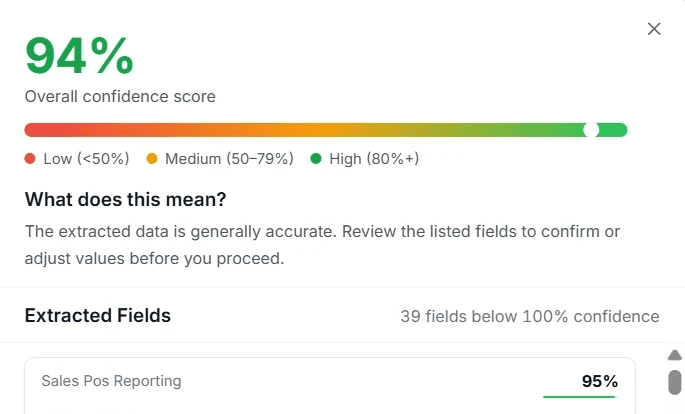
AI confidence score
Every processed document carries an overall confidence score on a low/medium/high scale with a plain-language explainer. Each extracted field shows its own score, and any field below full confidence gets an inline Edit control. Low confidence is never just reported; it's paired with the action to fix it, so trust becomes something the user can act on.
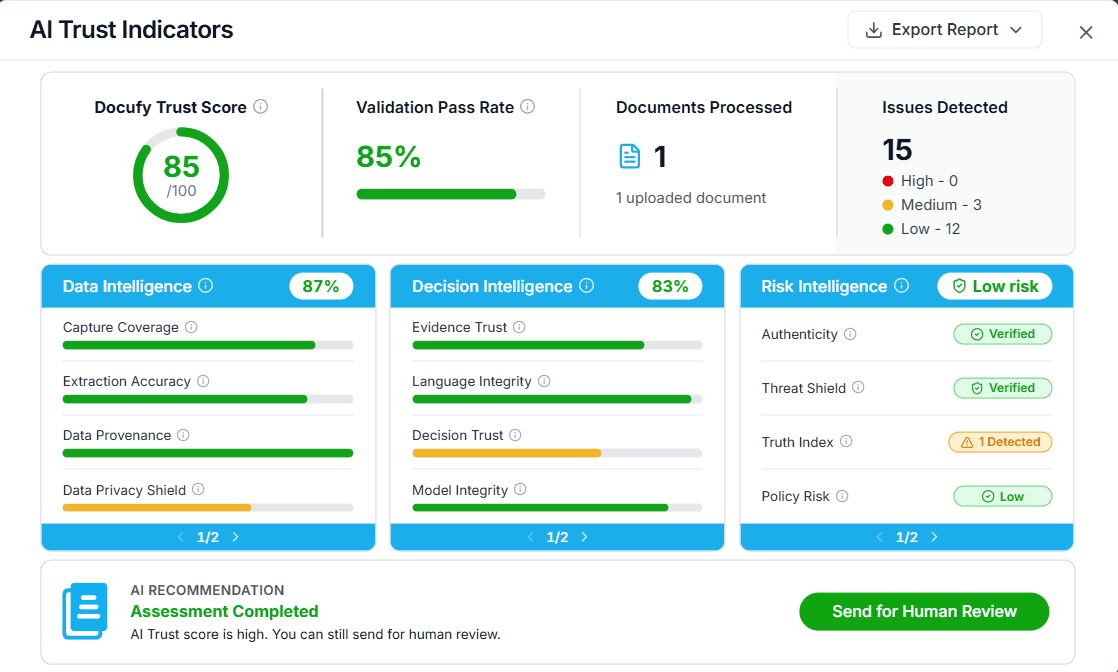
AI trust indicators
For a deeper view, the trust dashboard frames trust as a multi-signal assessment by closing with a recommendation to Send for Human Review. Even at a high trust score, a human-in-the-loop feature retains that trust.
This path is intentionally designed to address enterprise skepticism by never foreclosing human judgement.

Rist & fraud indicators
In sensitive document industries, a high accuracy rating doesn't mean a document is trustworthy. Alongside extraction confidence, I designed a layer that scores each document against risk and fraud signals such as authenticity, threat shield, truth index, fraud intelligence, tampering, and language integrity.
For users like claims analysts or a compliance reviewer, the design position is deliberate. The product surfaces signals and preserves the user's ultimate judgement, rather than automating a decision that carries legal and financial consequences.
LLM Key Configuration
In enterprise, importing LLM keys was becoming increasingly important, giving organizations control over which infrastructure their document data passed through. It was a governance requirement as much as a cost one.
The design decision was to let an organization supply its own key for each AI provider, with the capability to further control model availability, or fall back to Docufy's managed keys, so a team without procurement approval is never blocked from using the product, while a team with strict data policies is never forced to compromise.

07 -
Leading the team
As the only senior designer, my output ceiling was the team's. So I built a cadence around it.
During the summers, I had the help of seasoned interns. They designed the UI, marketing emails, marketing & product videos, and UAT testing, while I ran weekly reviews and feedback along with a separate mentorship sessions covering UX, systems thinking, tooling, industry norms, and emerging technology like AI.
Outside the summer terms I own everything end to end.
Shielding the interns
Managing interns in a pre-seed company means the pressure lands on them by default. Scopes are larger than the time available, delivery timelines set by fundraising rather than by the work, and briefs arrive ambiguous. A large part of my job was absorbing that pressure before it reached them.
ABSORBING PRESSURE
I pushed back, prioritized, and negotiated on demanding scopes and unreasonable delivery timelines rather than passing them down. Protecting the morale by helping the interns or checking in on them timely, is how I like to lead.
TRANSLATING
I broke large or ambiguous scopes into simple, understandable tasks, and explained the business reasoning behind work that didn't look meaningful at first before validated that need so the urgency the team felt was real rather than manufactured.
08 -
Lessons Learned
LESSON 01
Perfection is the enemy of survival
While cutting certain trust features felt like cutting trust itself, the pilot users told us what trust should look like. In pre-seed, protecting the runway meant designing for user needed when the time arrived.
LESSON 02
Trust is designed, not declared
Saying an AI is trustworthy does nothing for a skeptical enterprise user. The Beta features are the ones that earned it.
LESSON 03
Scaling yourself is a design skill