
CASE STUDY - 0-TO-1 INTERNAL + PARTNER TOOLING | AI ASSISTED DESIGN
dcbel Field Technician App
dcbel technicians run site surveys and installations with no structured way to log their findings, leaving CX and sales to track them manually. I owned the design strategy and delivered a working MVP for a native app.
My Role
Design & strategy
Tools
Figma, Miro, Claude Code
Timeline
Aug 2026 – present
Information architecture
User flows
Design strategy
Feature prioritisation
Heuristic & cognitive evaluation
AI-assisted prototyping
Stakeholder management
Scope negotiation
01 -
Context: an operational problem, not technology
CX and sales teams tracked field assessments and installation progress manually. The volume of work made the process unsustainable.
dcbel technicians conduct field surveys before installing Ara (smart home energy unit) at customer homes. They had no structured way to capture their surveys, which reached the business through emails and messages.
That gave dcbel no reliable visibility into field activity and put a growing coordination burden on teams. The need was acute and predated my involvement. As Ara installations scaled, manual tracking started failing.
how might we
How might we give field technicians a fast, structured way to capture survey and installation while giving dcbel teams reliable visibility into field progress without manual tracking?
Engineering handoff in two weeks
Owned the full path from IA, user flows, feature value assessments, wireframes, evaluation, to remediation.
24 issues resolved
Identified through heuristic, usability, and cognitive evaluation of an AI-generated build, ranked by criticality.
02 -
RESEARCH & scoping
We finalized two user personas for the MVP. The person conducting the survey and the person selling to customers.
I spoke with our in-house field technician and the project lead. They helped me understand the current gap in technicians' needs and what the product should eventually do. Together, they covered both ends of the problem: field execution and business intent.
I then sat down with the project owner to agree on the MVP scope, keeping it deliberately narrow given the project's urgency.
03 -
Design strategy
Before a line of code existed, I defined the structure of the app.
Anchored in design thinking, I first developed the following artifacts
Information architecture
Organizing survey and installation data into a structure technicians could navigate quickly.

User Flows
Mapping the paths through field surveys and an Ara installation, including progress logging.

Feature value assessments
To decide what earned a place in an urgent MVP and what could wait

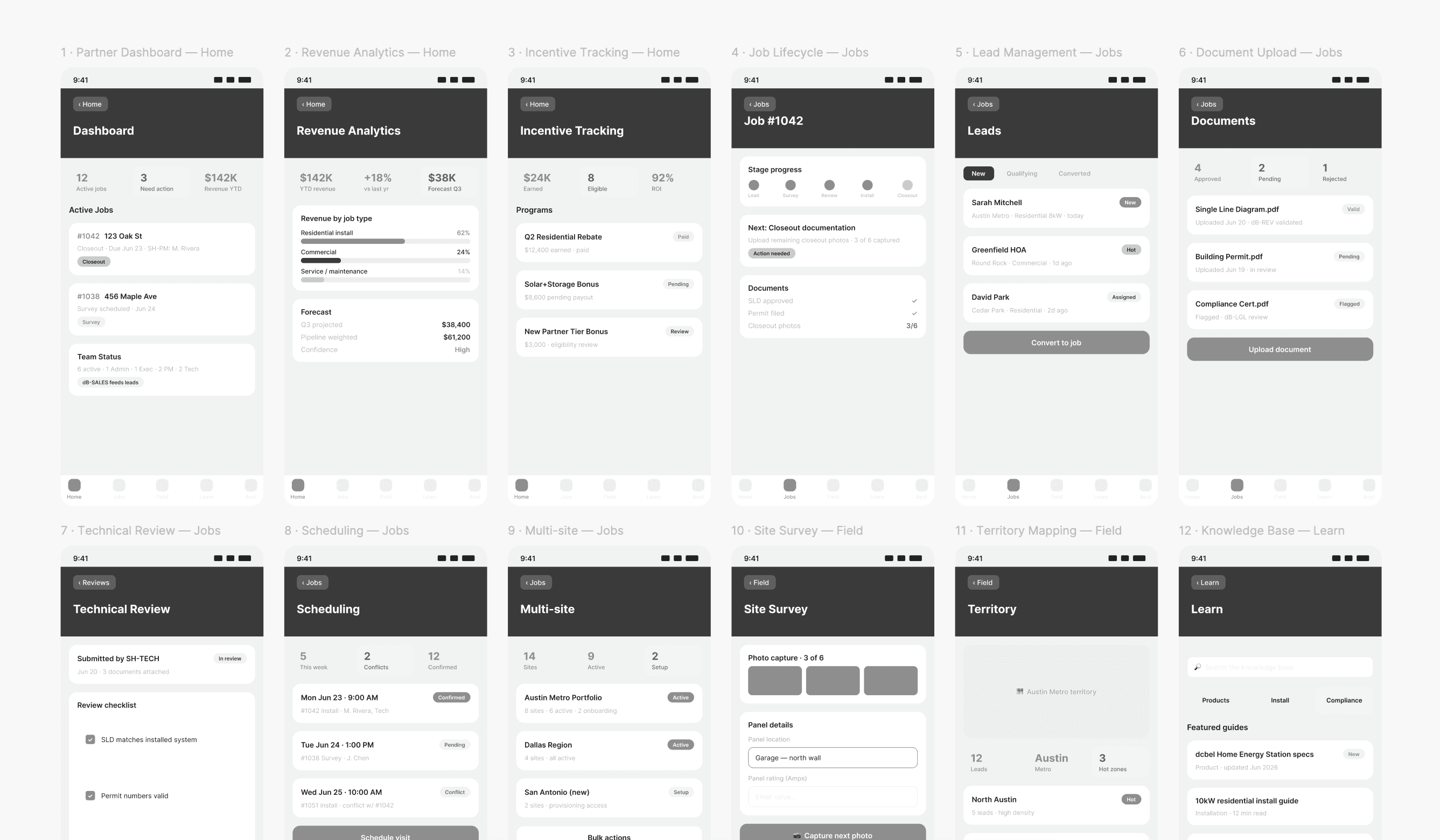
Wireframes
Translating the structure into screens.
04 -
Adapt & compromise: a working build that wasn't usable
The project lead independently vibe-coded an MVP. While on-brand, it was functionally revealing and far below UX standards.
Rather than treating it as a speed bump, I treated it as a requirements artifact. Built by someone who speaks to customers daily, the code encoded the exact data points the business needed technicians to collect. Information that would have otherwise taken several rounds of stakeholder interviews to extract with precision.
What it did not have was usable interaction design. The question became how to preserve the content and requirements, while correcting everything it got wrong about heuristics, cognition, and usability?
05 -
Evaluation: 24 issues, ranked by criticality
I took the repository and evaluated it formally rather than redesigning it by instinct.
I ran three evaluations against the existing build.
Heuristics
Usability
Cognitive
06 -
Remediation: fixing it in the codebase
I used the same AI tooling that created the problems to resolve them. Scoped tightly to UX, I aligned with the strategy I had already defined.
Working directly in the repository, I removed parts of the app that weren't urgently needed. This meant further trimming the MVP.
I kept the existing look and feel exactly as built, which was based on dcbel's marketing brand book. I resolved the identified issues by making UX improvements so the finished MVP reflected a deliberate structure rather than the shape the AI had produced.
07 -
Handoff & status
The deliverable was not a spec. It was a working MVP that engineering could assess directly.
The remediated build is now with dcbel's software team and is being assessed for how it should be developed. It will be connected to the company's CRM system and hosted on the existing tech stack
08 -
Lessons learned
LESSON 01
When AI generation is cheap, objective evaluation is the scarce skill
Today, anyone can quickly produce working software. What that build can and cannot do separates functional software from usable software. The design contribution is to look for the relevant issues, which will become more valuable as AI generation gets easier.
LESSON 02
Someone else's prototype can be research
My first instinct when I saw a build that ignored UX standards was to treat it as rework. While it didn't meet UX standards, it captured the exact data requirements from someone who works with customers daily.
LESSON 03
New tools, same bar